
Wave-USB FX
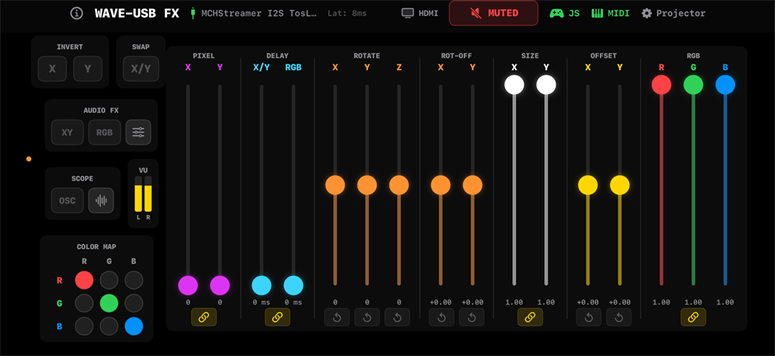
The Wave-USB FX app was designed as a convenient way to control and add effects to a 2nd laser projector that projects over a primary laser projector. The ideal configuration is shown below however, you can run the app with a single laser projector and without a signal source other than audio.
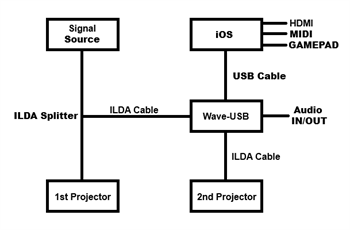
With the configuration on the left, you can add numerous effects that can overlay the primary laser projector image.
Without a signal source and with a single laser projector, the app will run with only the audio reactive features.
The app does not have a built in preview window, largely due to available screen space. If a preview window is needed, connecting an external HDMI monitor will show only what the laser projector is currently displaying and not the entire iOS screen.
For reference, the app was tested with an Insignia 4-port USB 3.0 hub and with Apple's USB-C Digital AV Multiport Adapter. The iOS device is an iPhone 16 Pro running version 26.
Without a signal source and with a single laser projector, the app will run with only the audio reactive features.
The app does not have a built in preview window, largely due to available screen space. If a preview window is needed, connecting an external HDMI monitor will show only what the laser projector is currently displaying and not the entire iOS screen.
For reference, the app was tested with an Insignia 4-port USB 3.0 hub and with Apple's USB-C Digital AV Multiport Adapter. The iOS device is an iPhone 16 Pro running version 26.
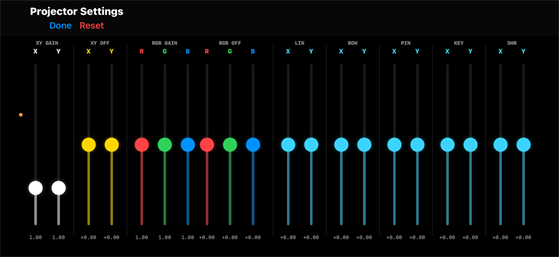
The projector settings control panel features X/Y Gain and Offset, RGB Gain and Offset as well as Geometric Correction. None of these settings are MIDI controllable. These settings affect the laser projector as well as HDMI.
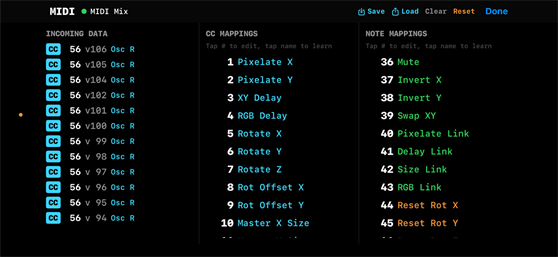
The app only supports a wired MIDI device. Nearly every slider and button within the app are MIDI controllable. MIDI configurations can be saved and reloaded, they are found in the iOS files app under the Wave-USB FX app folder. Tapping an effect enables learn mode, send a MIDI command to assign the effect.
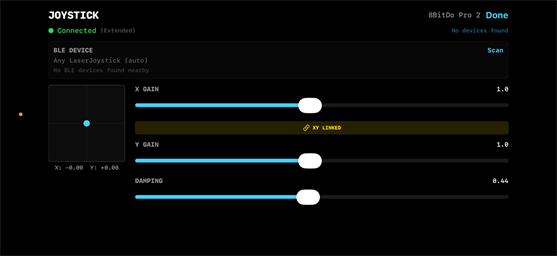
The app supports gamepads that are iOS supported, such as the 8BitDo Pro2. When linked, tapping the icon for "Rot-Off or Off" will assign the joystick to either or both of these effects. A small image of a gamepad will appear Rot-Off and Off icons when enabled. Enabling these will override any MIDI commands to control offset.
A similar joystick to the one used on the Z-5 is in development and will connect via BLE. The iOS implementation is already there, just the hardware needs to be finalized.
A similar joystick to the one used on the Z-5 is in development and will connect via BLE. The iOS implementation is already there, just the hardware needs to be finalized.
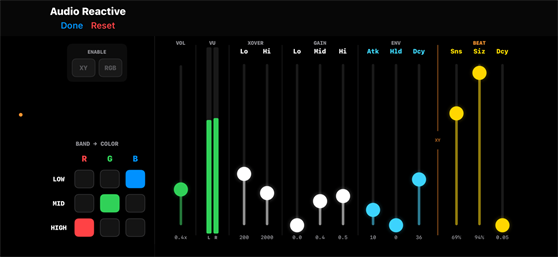
The Audio Reactive page is used to configure sensitivity to different audio frequencies as well as assigning certain frequency bands to output RGB colors.
For safety reasons, enabling RGB with audio playing has no effect unless you have an incoming signal from a DAC or have enabled one of the "Scope" functions.
If you are projecting a Red only image from a DAC while the app is trying to output only blue, no color will output from the laser projector.
For safety reasons, enabling RGB with audio playing has no effect unless you have an incoming signal from a DAC or have enabled one of the "Scope" functions.
If you are projecting a Red only image from a DAC while the app is trying to output only blue, no color will output from the laser projector.
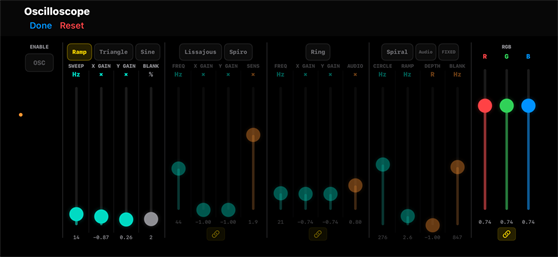
The Scope function allows the app to generate images without a signal source or, when enabled, will bypass the image being projected from a DAC.
When enabling OSC, short for oscilloscope, XY and/or RGB audio FX can also be enabled.
When enabling OSC, short for oscilloscope, XY and/or RGB audio FX can also be enabled.
That is all for now, a Demo video is coming soon! App available soon in the app store!

